Zeroing the Model MD-ET7 CO2 module The Model MD-ET7 CO2 module is compatible only with National Medical’s side stream CO2 accessories
Zeroing the Model MD-ET7 CO2 module
The Model MD-ET7 CO2 module is compatible only with National Medical’s side stream
CO2 accessories. The Model MD-ET7 CO2 module can automatically inspect if the ZERO
being correct or not and run an offset calibration program if the ZERO is error. When module runs the offset calibration program, there is no waveform being displayed (about 6 seconds), when the program running down, CO2 waveform will display again.
Also the operator can run an offset calibration if he feels the zero is error, but we DO NOT suggest an operator to do so. An “Offset calibration” is a quick process that allows the Host system to adjust to the special characteristics of a particular Model MD-ET7 CO2 module; it is necessary only when requested. Such a request will occur if a change is detected in the Model MD-ET7 CO2 module.
System does not allow offset calibration for 20 seconds after the last breath is detected.
System does not allow offset calibration if temperature is not stable
Offset calibration program maybe get a wrong ZERO if the ZERO hole is occluded.
NOTE
DO NOT jam the ZERO hole at any time. For best results, wait 5 minutes to allow the
Model MD-ET7 CO2 module to warm up before performing the offset calibration procedure.
Directions for Use of SINGLE PATIENT USE Nasal Side stream Kit
This kit is intended for monitoring the CO2 of non-incubated patients.
Select the sidestream annular kit that is appropriate for the patient size and application.
CAUTION:
The Nasal Cannula kit are intended for single patient use. Do NOT reuse or sterilize the cannula kit as system performance will be compromised.
1. Verify that the cannula kit is clean, dry and undamaged. Replace the cannula kit if necessary.
2. Insert the gas drier line into the Gas In connector as shown in Figure 1 on previous
page. Connect the gas drier line and the gas sampling line as shown in Figure 1. Connect
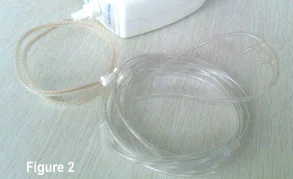
the gas sampling line and the Nasal Cannula as shown in :
http://www.meditech.com.cn/Meditech-Library/How-to-connect-Meditech-Capnography-monitor-with-Anesthesia-machine–
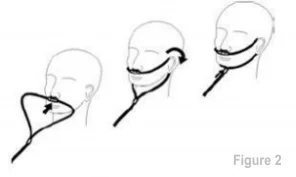
3. Place the nasal cannula kits onto the patient as shown in Figure 2.